EXPLORE DOTENC

OPEN SOURCE ENVIRONMENT ENCRYPTION

Your secrets.
Your repo.

Keep your environments next to your code.
Encrypted in Git. Unlocked with your SSH key.

No account. No hosted vault. Just your keys.

Meet the dotenc skill & plugin
.env.development.encENCRYPTED
dotenc brackets and mint dot
YOUR SSH KEY OPENS IT.
Built for the way you work.
Git-nativeLocal-firstMIT licensed

A SMALL ADDITION TO YOUR TOOLKIT

Three commands.
Then back to work.

Your editor, your terminal, your Git workflow.
dotenc takes care of the encryption.

01

Bring your SSH key

Initialize the project with your existing Ed25519 or RSA key.

02

Edit your environment

Use your editor. Save. Commit the encrypted file.

03

Run your app

dotenc loads the variables into your app’s process.

~/your-projectQUICK START

# Set up your encrypted environments

$ dotenc init --name alice

your-project/
├── .dotenc/alice.pub
├── .env.development.enc
└── .env.personal.alice.enc

# Add your personal variables

$ dotenc env edit personal.alice

# Start your app with its environment

$ dotenc dev npm start

FOR YOUR CODING AGENT

Your agent, now
fluent in dotenc.

Give your agent the workflows to set up encrypted environments, manage access, and run commands with dotenc.

A GOOD PLACE TO START
“Check this project
with dotenc doctor.”
dotenc doctor --jsonRead-only diagnostics
01 / CHATGPT & CODEXPlugins Directory

Add dotenc to ChatGPT.

The official plugin gives ChatGPT and Codex step-by-step guidance for setting up dotenc, managing access, and running commands with encrypted secrets.
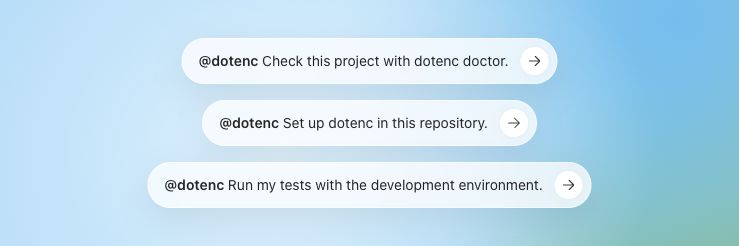
Example prompts in the ChatGPT Plugins Directory: check a project with dotenc doctor, set up dotenc, and run tests with the development environment. Get the official ChatGPT plugin
02 / STANDALONE SKILLskills.sh

Add the skill to your coding agent.

Use the official dotenc skill in Codex CLI, Claude Code, Cursor, OpenCode, and other compatible coding agents. Get practical instructions for encrypted edits, access changes, and running commands, with guidance to keep plaintext out of chat and logs.

npx skills add dotenc/skills --skill dotenc
Explore the skill

Start with dotenc installed, your repository, and an authorized SSH identity. Choose the skill or the plugin; the plugin already includes the skill.

AT HOME IN YOUR REPOSITORY

Everything in its place.

Code, configuration, and access.
One workflow you already know.

Secrets follow
the branch.

Ship an environment update in the same pull request as the code that needs it. Authorized developers can read changes locally with Git diff.

Explore the Git workflow
git diff

A key for each person.
Access per environment.

Add a teammate’s public key and grant access to the environments they need. Public keys and encrypted files stay in the repository.

Set up your team
alice.pub
bob.pub

From your laptop
to your pipeline.

Give CI its own SSH identity and run commands with the right environment. Use the CLI, GitHub Actions, or the VS Code extension.

Connect your workflow
dotenc run
-e test npm test

ENCRYPTION, WITH CLEAR BOUNDARIES

Public repository.
Private environments.

Read the security model

Each environment is encrypted with AES-256-GCM. Its data key is encrypted separately for each authorized SSH public key. Reading the repository alone isn’t enough to decrypt it.

Repository writers and the machines running your code are trusted. After offboarding, rotate external credentials a former teammate could have known.

AES-256-GCMEd25519 / RSALocal encryption

READY WHEN YOU ARE

Make your next
commit encrypted.

Install dotenc. Open your repo.
Bring your SSH key.

All installation methods

For macOS, Linux, and Windows with Git Bash or MSYS2. The installer selects an available package manager.

curl -fsSL https://dotenc.org/install.sh | sh
Inspect the install script

Install with Homebrew on macOS or Linux.

brew install ivanfilhoz/dotenc/dotenc
Homebrew instructions

For any platform with Node.js installed.

npm install -g @dotenc/cli
View the npm package

Install with Scoop on Windows.

scoop bucket add dotenc https://github.com/ivanfilhoz/scoop-dotenc
scoop install dotenc
THEN, IN YOUR PROJECTdotenc init

Yours to use. Yours to improve.

Open source, under the MIT license.
Explore the source